
Start with a quick CPU battle
Open the game player and select Play now. This site runs its own Unity browser edition against the CPU. These instructions apply to that edition; Big Kid Nation and Empress are separate projects.
- In the game menu, open Settings and set Battle difficulty to EASY while learning.
- Open Your team to choose one to three Pokémon. Select View moves on a card to inspect its four moves, PP and cooldowns.
- Select Choose arena, pick Indigo Stadium, then select FIGHT. For a faster rematch with your current team, Quick battle takes you straight to arena selection.
A useful first goal: land one deliberate hit, avoid one incoming attack and switch to a living teammate. You can learn more from those three actions than from pressing every move at once.
Keyboard and touch controls
| Input | What it does |
|---|---|
| WASD / arrow keys | Move and set your facing direction. Face the opponent before using a directional attack. |
| 1–4 | Use the matching move slot. The four move cards show what is available. |
| Space | Dodge. It has a cooldown, so time it rather than holding it as a permanent escape. |
| Q / E | Cycle backward or forward through living teammates. A one-Pokémon team has nobody to switch to. |
| P / Esc | Pause. Losing browser focus also pauses the battle. |
On a phone or tablet: enable Touch controls in Settings if needed. Use the movement stick, tap a move card, and use the on-screen Dodge, Switch and Pause controls. Landscape gives the arena and move cards more space.
If keyboard inputs scroll the page or do nothing, click inside the game or select Focus game below the player. Resume a paused match before trying another move.
A three-minute practice plan
This is a suggested exercise, not an extra mode or a longer match timer. A battle lasts up to 120 seconds; start another quick battle if you need more practice.
- Minute one: move, stop, face.
Move around the stadium without attacking. Stop with the opponent in front of you, then use one move. Watch its direction and range rather than chasing the damage number.
- Minute two: read an attack and leave its path.
Keep some distance so you can see an incoming projectile. Move sideways or time a dodge. Try putting a solid crate between you and a straight-line attack, then step out to return fire.
- Minute three: switch and review.
Bring a second teammate, switch once when you have space, and inspect that Pokémon’s move cards. After the result, choose one adjustment for the rematch: aim before casting, waste less PP, or keep more team HP.
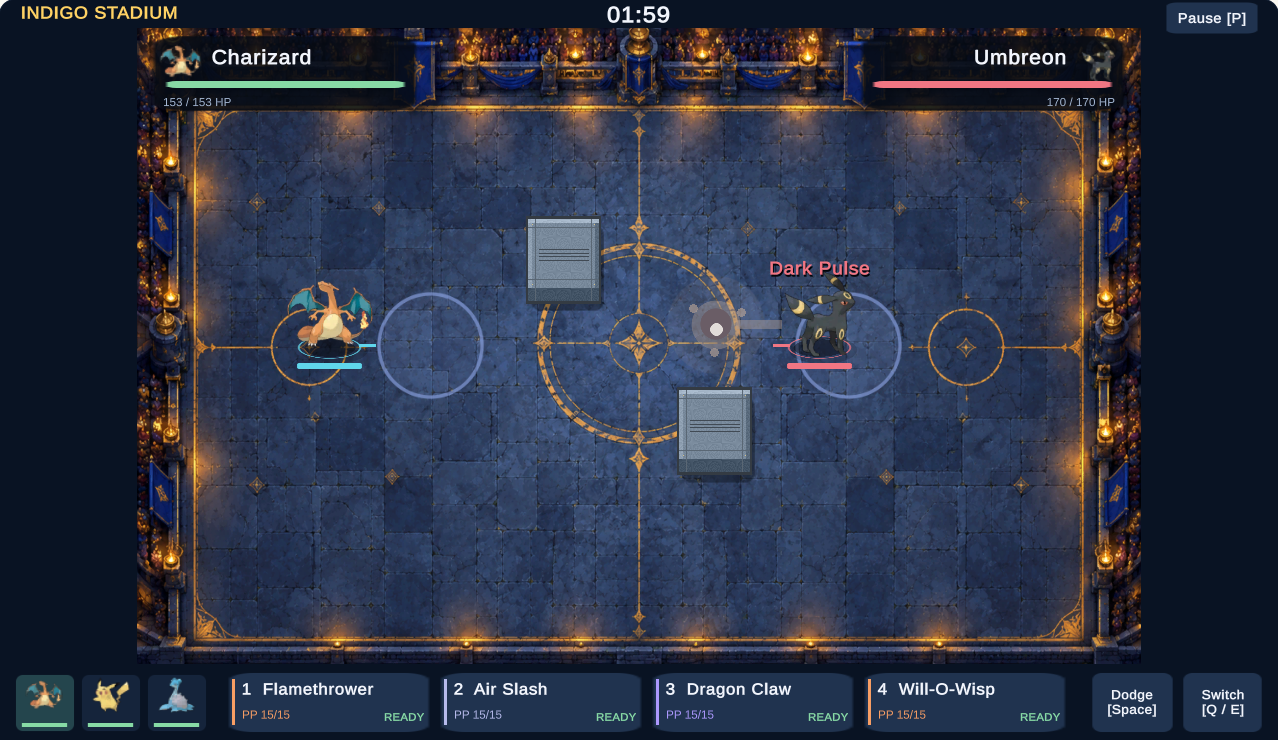
Cover is a positioning tool, not a promise of safety from every attack. Read the arena and cover guide for the difference between solid obstacles, open lanes and decorative scenery.
What counts as a win?
Knock out every Pokémon on the opposing team to win before time runs out. Defeating the active opponent is not enough if it still has living teammates.
At the 120-second limit, the game compares each team’s remaining HP as a proportion of its total maximum HP. The higher proportion wins; almost equal proportions produce a draw. It does not simply compare the HP bars of the two active Pokémon.
Switching can protect a weakened teammate, but it does not erase the damage already taken by your team. Once the basics feel familiar, try Story challenges to work toward the badges shown in the game’s Badges menu.
Why a move may not fire or hit
- PP is a limited use count. A move with no PP cannot be selected normally. If every move is exhausted, slot 1 provides the game’s Struggle fallback.
- Cooldown is a wait between uses. Having PP left does not mean a move is ready immediately. Check the move card before pressing it again.
- Actions need a clear moment. A dodge, an existing cast, recovery, stun or sleep can prevent a new cast. Switching also needs a living teammate and a ready switch.
- Range and facing matter. Being able to press a move does not guarantee a hit. Move into range, face your target and allow for the opponent moving away.
Settings includes Aim assist, but it still depends on range and facing. Keep your first practice simple: learn one Pokémon’s four moves before changing the whole team.
Loading, controls and a smoother session
The loading screen is taking a while
The first visit downloads the browser game files. Watch the progress indicator and keep the tab open. If the player offers Try again after a delay or error, use it to start a fresh load. The player’s New tab option opens this site’s own game directly if the embedded view causes trouble.
The battle runs, but the controls feel stuck
Select Focus game, click or tap inside the arena, and check whether it is paused. On touch devices, return to Settings and enable Touch controls. Full screen depends on browser and device support; the player remains usable without it.
The effects feel too busy
In Settings, try Battle effects: REDUCED for fewer particles and no dodge echoes or hit recoil. Turn Atmosphere off if you prefer less weather and ground lighting. These options reduce visual clutter; they are not a guarantee of a particular frame rate.
Restart starts over. The player’s Restart and Close game controls end the current running session. Try focus and pause controls first if you want to preserve the match you are playing.
Controls and match rules were checked against this site’s Unity application and battle simulation on October 23, 2026. The practice plan is a suggested way to learn this edition.